Portal Menus > Umbria Basics > Global Search
Elastic Search
You can customize your search criteria with the Elastic search feature. This feature offers quick searching and filter options for different types of entity records so that you can review and modify information on the Experience and Relationship Dashboard. The Elasticsearch feature can be accessed from all the Umbria screens.
When installing Elasticsearch on a different server from the Umbria Web Server, for Elasticsearch to work:
- Specify the server name on the Network Host on the install dialog or modify the elasticsearch.yml config file to update the network host name.
- On the server where Elasticsearch is installed, create an inbound rule on the firewall to accept traffic from 9200-9300 ports.
General Search
- On the Umbria Dashboard, click on the magnifying glass icon to open the Search bar.
- Type in any search criteria and press Enter on the keyboard. The screen refreshes, showing a list of all matching results.
- Tabs that appear that can filter the information by category are:
- All- shows all results
- Matters
- Opportunities
- Clients
- Directory- Shows employees
- Vendors
- External People
- Other Company- for other companies that don't fall under vendors, external or clients.
Note: If the Elasticsearch service is stopped, a note will be displayed on the search result page; "Search performance is degraded and certain features have been disabled. Please use the form search for look-ups." To re-enable Elasticsearch, start the service on the Windows Services (Local).
Advanced Search
- You can also use the Advanced Search feature. Type "#" to select from a pre-defined search option list.

- As per the selected search fields, further search options are suggested.

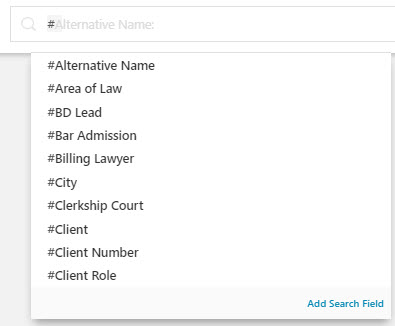

Note: Further search options are prompted, only if Elasticsearch is enabled as a service. If the Elasticsearch service is stopped, a note will be displayed on the search result page; "Search performance is degraded and certain features have been disabled. Please use the form search for look-ups." To re-enable Elastic Search, start the service on the Windows Services (Local).
| Operator | Description |
|---|---|
| AND | Use AND to include two search terms. For e.g. #Area of Law: corporate #Billing Lawyer: marcus, alexey AND #Matter Subtype: appeals . The search results will display all corporate matters with Alexey Marcus as the Billing Lawyer and with Matter Subtype Appeals. |
| OR | Use OR to broaden your search criteria. For e.g. #Area of Law: corporate #Billing Lawyer: marcus, alexey OR #Responsible Lawyer: gordon, richard. The search results will display all corporate matters with Alexey Marcus as the billing lawyer or matters that have Richard Gordon as the responsible lawyer. |
| NOT | Use NOT to exclude a search item. For e.g.#Area of Law: corporate NOT #Matter Number: 0020. The search results will display all corporate matters except matter number 0020. |
| Combine Operators |
- The All tab will show all the general search results and the other tabs will show data relevant to the tab. For e.g. the Matter tab will list only matters specific to the search criteria.
Tip: On each tab, the result count and the search time is displayed.
Search Suggestions Action Menu options
| Search Field | Options Displayed | Description |
|---|---|---|
| Matter | Budget | View the Matter Budget page. |
| Planning | View the Matter Planning page. | |
| Rate Card | View the Matter Rate Card page. | |
| Arrangements | View the Matter Arrangements page. | |
| Comments | View the Matter Comments page. | |
| Monitor | View the Matter Monitor page. | |
| Revenue | View the Matter Revenue page | |
| Trust Accounts | View the Matter Trust Accounts page. | |
| Time Entries | View the Matter Time Entries page. | |
| Expenses | View the Matter Expenses page. | |
| Matter Performance Variance | View the Matter Performance Variance page. | |
| Players and Parties | View the Matter Players and Parties page. | |
| Tasks | View the Matter Tasks page. | |
| Matter Family | Budget | View the Matter Family Budget page. |
| Planning | View the Matter Family Planing page. | |
| Comments | View the Matter Family Comments page. | |
| Monitor | View the Matter Family Monitor page. | |
| Players and Parties | View the Matter Family Players and Parties page. | |
| Opportunity | Budget | View the Opportunity Budget page. |
| Planning | View the Opportunity Planning page. | |
| Rate Card | View the Opportunity Rate Card page. | |
| Comments | View the Opportunity Comments page. | |
| Players and Parties | View the Opportunity Players and Parties page. | |
| Proposal | View the Opportunity Proposal page. | |
| Tasks | View the Opportunity Tasks page. | |
| People | Matters | View the People Matters page. |
| Clients | View the People Clients page. | |
| Tasks | View the People Tasks page. | |
| Clients | Health Check | View the Client Health Check page. |
| Arrangements | View the Client Arrangements page. | |
| Rate Card | View the Client Rate Card page. | |
| Revenue | View the Client Revenue page. | |
| Other Company | Company | View the Company page |
| External Category | View the external category | |
| Area of Law | View the Area of Law. |
